Stick Slop · Getting started
Miss Stick Arena? Start with Stick Slop.
Small characters, weapon pickups and short fights. Stick Slop is our take on that top-down arena format. Here’s how to find your way around the title menu, get moving and get a room going.
In this guide
Start from the title menu
The title screen runs a live bot brawl behind the menu: Play online, Practice, Armory, Player, How to play and Options. Use the mouse, touch, the arrow keys or WASD with Enter, or a gamepad. Esc or Backspace goes back.
- Practice opens the match setup folder. Pick an arena, the number of opponents, bot attitude, round length and rules, then press Start match.
- The Quick match line under Practice skips setup and starts with your saved arena, bots and rules.
- Player sets your alias and color and shows your frags, wins and rounds. Armory lists the weapons.
Learn the movement before joining a room
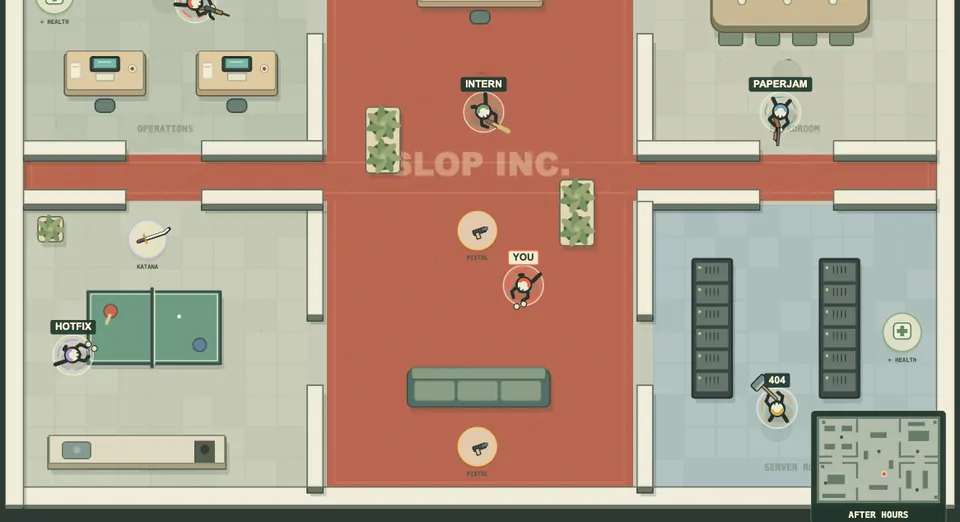
Start against NPCs so you can get used to moving and aiming separately. Use WASD or the arrow keys to move, aim with the mouse and fire. Press E to swap weapons and Tab for the scoreboard.
Touch controls are included too. Use the game page’s Expand control if the play area feels cramped. A short practice round will tell you more about the controls than sitting in the menu.
Know which match you joined
Classic play uses timed deathmatch. Arcade Space adds a dodge and a race to twenty frags. There are three arenas, so check the map and rules before assuming every round works the same way.
Weapon pickups are part of the fight. Learn where they are while you’re learning the routes; staying in the same spot makes both jobs harder.
Create a room for friends
Choose Play online and sign in, then pick an open room or share a room code. The default room size is eight players. Larger Freight Night and Sludge Works layouts support ten or twelve. Hosts can configure round length, map rotation and bot fill.
Share the room code with the people you want to play with. Bots help fill a small session while you wait, but a room’s capacity isn’t a count of humans currently playing.
What gets saved?
Your alias, color and match setup are remembered. An account saves supported settings and career totals. Guest progress stays in that browser. Keep the same account when switching devices; each Slopclip game has a separate save. Your old Stick Arena account and stats cannot be imported.
How close is it to Stick Arena?
The comparison is the top-down movement, weapon pickups and short competitive rounds. Stick Slop is a separate game with its own arenas, code, rules and accounts. It does not run the original Stick Arena or connect to its servers.
If that quick arena format is what you miss, try a round. If something feels off, leave a comment under the game and say what happened. Specific feedback is how this gets better.
About the classic name
Stick Arena belongs to its respective rights holders. Slopclip is not affiliated with or endorsed by them. The name identifies the comparison, not a version of the original game.